
Insta Pro APK Download v15.75

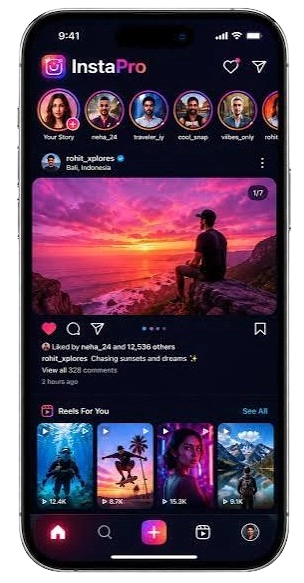
The Insta Pro APK is an advanced Android application that helps users make their use of Instagram even more versatile. The current update includes a user-friendly interface and other helpful elements. To use Insta Pro APK on a device running the Android operating system, you need only a few steps to complete. You will be able to browse posts, view your reels, and discover new content on Instagram using this application.
| App Name | Insta Pro |
|---|---|
| Version | v15.75 |
| Size | Varies |
| Platform | Android |
| File | APK |
| Category | Social |
| Language | Multiple |
| Updated | 2026 |
Insta pro ♕
Insta Pro is a customized version of Instagram that allows users to use some additional features while using the social media platform through their Android devices. Users will have the same kind of interface while using this app, thus allowing them to browse posts, watch reels, and see stories without having to learn something new.
Most users prefer Insta Pro because of the need to use Instagram through a different platform. The app can be downloaded by Android users through the APK file. The users will have to verify the version of the app and the compatibility of their device before downloading the file.
what is Insta pro ♕?
Insta Pro APK is one of the applications designed for the Android platform and based on Instagram. The app enables its users to browse through their photos, videos, reels, and other social media content easily. This app has a straightforward interface and is perfect for those who have used Instagram before and would like to try something new.
It is popular among Instagram users due to some additional settings and options available in this application. To install the app on your Android phone, it is possible to download the APK file and use it. It is necessary to pay attention to the version and source of the installation to avoid any risks.
why people use Insta pro ♕ apk?
There are many reasons why Android users decide to try Insta Pro Mod Apk one of them is their desire to get a new experience in social media with many possibilities. It has an easy-to-use interface which allows users to view pictures, clips, and other media content. Moreover, there are some users who like to have many options to customize the interface. Navigation in Insta Pro is very easy. This modified version of Instagram can help people who need more features in one application.
- Offers additional privacy options for personalisation of the user experience.
- Provides theme options to alter the entire appearance of the application.
- Provides users with additional options to view pictures, videos, and other media.
- Makes it easy and comfortable to scroll through the feed.
- Helps users easily go through reels and short videos.
- Enables users to explore stories and updates from various accounts.
- Offers additional settings to customise certain aspects of the interface.
- Has a familiar interface that is easy for Instagram users to navigate.
- Works on compatible Android phones and tablets.
- Provides an easy way to install the APK.
♕ Insta pro premium features ♕
Additional Privacy Settings
Insta Pro allows additional privacy settings to help the user to get better control of the social media application. These settings allow making changes to certain aspects of the application in accordance with individual requirements. The settings are located in a conventional interface for better accessibility. The user is recommended to consider each setting before turning it on.
Customization Options
Different settings are provided which allow making changes to different aspects of the interface. They will be helpful when the user wants a personalized look of the application. The simplicity of the interface design will ensure the convenience of the search process.
Effortless Content Browsing
The application is oriented towards the easy scrolling of photos, videos, and social media content. Its convenient design will allow switching from one section to another with ease. The content can be viewed in the main feed and other sections. For online content a steady internet connection is required.
Reels Browsing
The reels section contains short videos. The familiar video interface allows scrolling through videos easily. This is a convenient method to view different types of short content. The performance depends on the hardware and the quality of the network.
Story Access
The stories make it possible for users to access the updates temporarily posted by various accounts. The function makes the story updates available within the social media platform interface. The user can navigate between various available stories using controls provided.
Notification Settings
The notification settings allow users to control notifications sent through the application. The users can configure the available options according to the updates preferences that they have. This will minimize unwanted disturbances while using the application. The available settings may vary depending on the app version.
Media Functions
The application allows users to access the different kinds of visual media that it offers in one place. Various media options include photos, videos, reels and stories within the available sections. The familiar layout makes media browsing easy. Performance of the device may affect the media playback.
Profile Navigation
The profile sections are arranged in a way familiar to social media users. The user can navigate between the available profile details, posts and various other options. The familiar layout makes navigation easy. Some functions may depend on the installed version.
Interface Preferences
There are various settings that can be adjusted to affect some aspects of viewing. These interface preferences allow users more flexibility than the default layout. They are meant to help users have an easier time using the interface. Not all settings are available for all versions.
Fast Content Loading
The program is designed to provide the best browsing experience if there is an appropriate connection. Pages and media files can load based on the network speed and capabilities of the device. Regular updating of the app can also help enhance its performance. Actual loading time may vary from one user to another.
Clean Feed Layout
The feed section displays social content through a simple scroll format. Users can navigate through the content easily without having to worry about complex menus. The clean layout makes it easy for users to browse the app through small devices. The experience will be different on other devices.
Additional App Settings
Insta Pro comes with more controls which allow users to make more options in certain settings. These controls are helpful for people who like making adjustments to their app experience. The controls can be accessed mostly through the settings menu.
Switching Accounts
If there is a user managing several accounts on social media, he or she may benefit from the presence of an account switcher, which is possible to have depending on the version of the app. It will decrease the necessity of entering credentials every time.
Friendly Menus
The menus of the app are developed in order to remain friendly to those users who are familiar with the Instagram navigation. Popular options are reachable through simple steps. There are separate sections in order to make it easier to find needed settings and content. It makes this app convenient for browsing.
Compatibility Devices
The application is aimed at compatible Android phones and tablets. The interface of the app is able to adjust itself according to the screen size of your device, depending on the version you have installed. Users should be aware of the Android requirements before installing.
Features Available Quickly
Social features that are used frequently by users are available in familiar navigation sections. Therefore, fewer actions are required to perform usual browsing operations. User can quickly switch between sections and content.
Insta pro ♕ Android Download steps
- Verify whether your Android device is compatible with the necessary application version.
- Download the Insta Pro APK file from a reliable source.
- Ensure that there is sufficient free memory on your mobile phone.
- Ensure a stable internet connection while downloading.
- Check the APK version prior to the installation process.
- Update your Android device regularly to ensure compatibility.
- Install the APK application only if the source of the file is reliable.
- Scan the downloaded APK file if there are any security issues.
- Proceed with installation using the Android installation procedure.
- Launch the application to test its basic features.
Insta pro ♕ iOS Download steps
- Insta Pro APK is a file format for Android APK and cannot be installed directly onto iPhone.
- IPA files are used for iOS and not APK files.
- Do not attempt to change the extension of an APK file in order to use it on iOS.
- Ensure that there is an official version available for iOS before making any installations.
- Do not accept unknown profiles or certificates which seek more permissions than necessary.
- Ensure that your device is running the latest version of iOS.
- Use the App Store for downloading Instagram normally.
- Take note of permissions of any third-party app before using it.
- Never type in your account details at a suspicious installation service.
Insta pro ♕ pc/window Download steps
- Insta Pro APK has been created to be used on Android devices.
- For Windows OS users, an emulator compatible with Android APK files must be used.
- The emulator should be downloaded from a legitimate source.
- APK file download should be done after confirming its version.
- Launch APK in the emulator using installation feature.
- Ensure that the PC meets the necessary requirements such as RAM and space.
- An Internet connection ensures that you download and browse smoothly.
- Ensure that your PC’s Windows and emulator are up to date.
- Use a legit security software while dealing with APKs downloaded from unknown sources.
common problems and their solutions
APK Installation Problem
See if your Android version is compatible with the APK and if the APK has been fully downloaded to your phone.
App Keeps on Crashing
Make sure that you have restarted your phone and cleared the cache of the app. See if there is an update for the app available.
Login Problem
See if your internet is working and your credentials are correct. Don’t use your account credentials on any suspicious service.
Videos or Reels Are Not Loading
Check your internet connection and see if there is any problem with the application’s cache.
App Runs Slowly
Free up some storage and close unnecessary applications in the background. Running the compatible version of the app will fix your issue.
APK Is Showing Compatibility Problem
The file you have downloaded does not support your Android version and device architecture.
Insta pro ♕ All Versions & Differences
| Version | Main Changes | Improvements |
|---|---|---|
| v15.75 | Hidden features unlocked | Chat icon bug and random crashes fixed |
| v15.70 | Picture-in-Picture feature added | Download button bug and stability problems fixed |
| v15.60 | Custom Story Font feature added | Profile post download button back |
| v15.50 | Instagram base upgraded | Other bug and stability fixes |
| v15.35 | Instagram base upgraded | Privacy toggles added |
| v15.30 | New Instagram base 431.0.0.47.82 | Image comments, Auto-Scroll and stability issues fixed |
| v15.25 | Instagram base upgraded | Performance fixes |
| v14.90 | Old Instagram base | Stable build for those who need the old version |
| v13.10 | Repost and Reel Preview features added | Story thumbnails, upload time and profile copying |
| v12.85 | Improved media downloads | Sound download and crash fixes |
| v12.65 | Activity History controls feature added | Story repost and WhatsApp Status sharing |
top alternatives
Honista
Honista is yet another Instagram clone that gives some additional options in terms of interface and privacy settings. It is intended for those users who need more flexibility compared to the standard Instagram app. This app retains the usual layout but gives some additional settings options.
Instagram Lite

Instagram Lite is a light version of the official Instagram application. It is designed to consume less memory and less data, providing some basic Instagram features like posts, Stories, and Reels. It can be helpful for users with less device storage capacity and low-internet connection speed.
Threads

Threads is a social platform from Meta that pays more attention to text-based communication. Users can post messages, reply to messages posted by other users, follow accounts, and participate in various threads.

Instagram is the official Instagram social media application that lets users share images, videos, Reels, and Stories. In addition to direct messaging and profile-related options, the platform offers many ways to connect with other users. It is recommended for users who want the authentic Instagram experience.
Instander

Instander is another alternative app available to users on the Instagram platform, which provides more options aside from the typical app. The app allows for customization and more privacy and setting options for those who need more control.
AeroInsta
AeroInsta is a customized Instagram-like app offering more customization options. It offers users some other settings that help modify certain aspects of the interface. The application could be a suitable choice for those seeking to customize their Instagram experience.
pros and cons
pros
- User-friendly interface similar to Instagram
- Additional customization options
- Privacy settings
- Efficient browsing process
- Photo, video, Reels, and Stories support
- Media management tools
- Effortless APK installation
- Frequent improvements in the app version
- More control over the app use
- Applicable to many Android devices
cons
- Not available on the Google Play Store
- Security of the app relies on where you get the APK file from
- The app features may become dysfunctional following updates in Instagram
- Incompatibility with some Android devices
fAQS
Can Insta Pro run with Instagram?
Yes, both can work together if package names are different.
Does Insta Pro need root?
No, root access is usually not required.
Can I download Reels?
Yes, supported versions may offer Reel downloads.
Why does Insta Pro crash?
An incompatible or outdated version may cause crashes.
Can I use multiple accounts?
Yes, you can usually add multiple accounts.
Why does login fail?
Incorrect details or compatibility issues can cause login errors.
Can I save Stories?
Yes, some versions include Story-saving features.
Does it work on every Android phone?
No, compatibility can vary by Android version.
Why do features disappear?
Features can change between different APK versions.
Should I update Insta Pro?
Use a newer compatible version when an update is available.
final words
Insta Pro Latest Version 2026 can be considered as an effective option for Android users, as it provides some additional features besides Instagram itself. In addition to the regular Instagram experience, it may offer additional features like photo and video saving, Reels, Stories, account management, and other customization features. Such features can be beneficial for those users who want to get some extra options when using the app. Simple UI will also facilitate finding and using the features of the application.
However, before downloading the APK of the Insta Pro, one should consider its compatibility with the user’s Android system. In addition to that, one should pay attention to the permissions that it asks, as well as select a reliable source of downloading the APK. As different versions of the APK can offer different features, it may be beneficial for the user to choose the right version of the APK to avoid crashes and possible issues with logging into the Instagram account.